Difference between revisions of "Effort reporting in 5 steps pictures"
From Help.4pm
Jump to navigationJump to search| Line 3: | Line 3: | ||
Please follow steps described in pictures below. | Please follow steps described in pictures below. | ||
| − | # Enter 4PM and in left tab select '''My projects / I participate''' and click Fortissimo (name of the project) | + | # Enter 4PM and in left tab select '''My projects / I participate''' and click Fortissimo (name of the project) [[File:Effort_1.jpg]] |
| − | [[File:Effort_1.jpg]] | + | # Click the tab '''Resources''' within the project Fortissimo: [[File:Effort_2.jpg]] |
| − | # Click the tab '''Resources''' within the project Fortissimo: | + | # Click tab '''Effort''': [[File:Effort_3.jpg]] |
| − | [[File:Effort_2.jpg]] | + | # In the list of project partners find '''your organization''' and '''click the name''': [[File:Effort_4.jpg]] |
| − | # Click tab '''Effort''': | + | # '''Fill in''' the effort table and '''SAVE''' the entry. [[File:Effort_5.jpg]] |
| − | [[File:Effort_3.jpg]] | ||
| − | # In the list of project partners find '''your organization''' and '''click the name''': | ||
| − | [[File:Effort_4.jpg]] | ||
| − | # '''Fill in''' the effort table and '''SAVE''' the entry. | ||
| − | [[File:Effort_5.jpg]] | ||
Once you have find this page, you can add it to the [[favorites]] (upper right corner, icon of the star) – 4PM creates shortcut. | Once you have find this page, you can add it to the [[favorites]] (upper right corner, icon of the star) – 4PM creates shortcut. | ||
Revision as of 15:06, 20 December 2013
FP7 Effort reporting in 5 steps
Please follow steps described in pictures below.
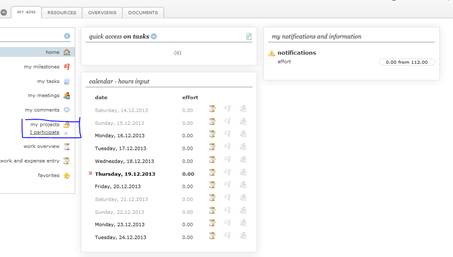
- Enter 4PM and in left tab select My projects / I participate and click Fortissimo (name of the project)
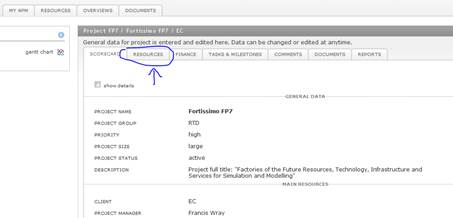
- Click the tab Resources within the project Fortissimo:
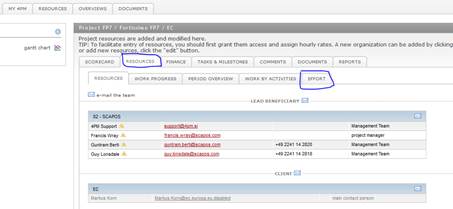
- Click tab Effort:
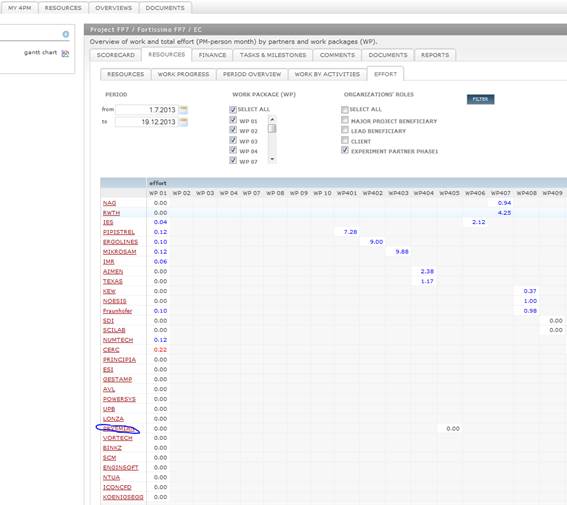
- In the list of project partners find your organization and click the name:
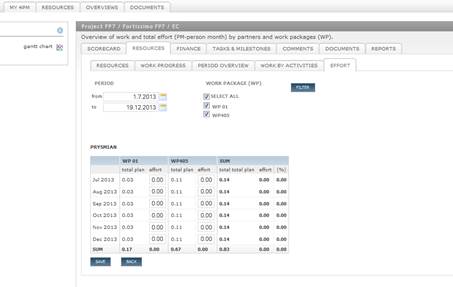
- Fill in the effort table and SAVE the entry.


Once you have find this page, you can add it to the favorites (upper right corner, icon of the star) – 4PM creates shortcut.
